For Telegram, on your Mac
Deleted messages don’t vanish anymore.
Aftergram keeps a private log of your Telegram on your Mac. When someone deletes or edits a message, the original stays here — with when it was sent, when it disappeared and what it said before.
Free forever for one account · Pro $19 once · 7-day Pro trial included
The app
Your chats, with nothing missing.
A calm log that lives in the menu bar. Private chats and groups side by side, deletions in ember, edits in lavender, replies quoted the way Telegram shows them, and every version one click away.
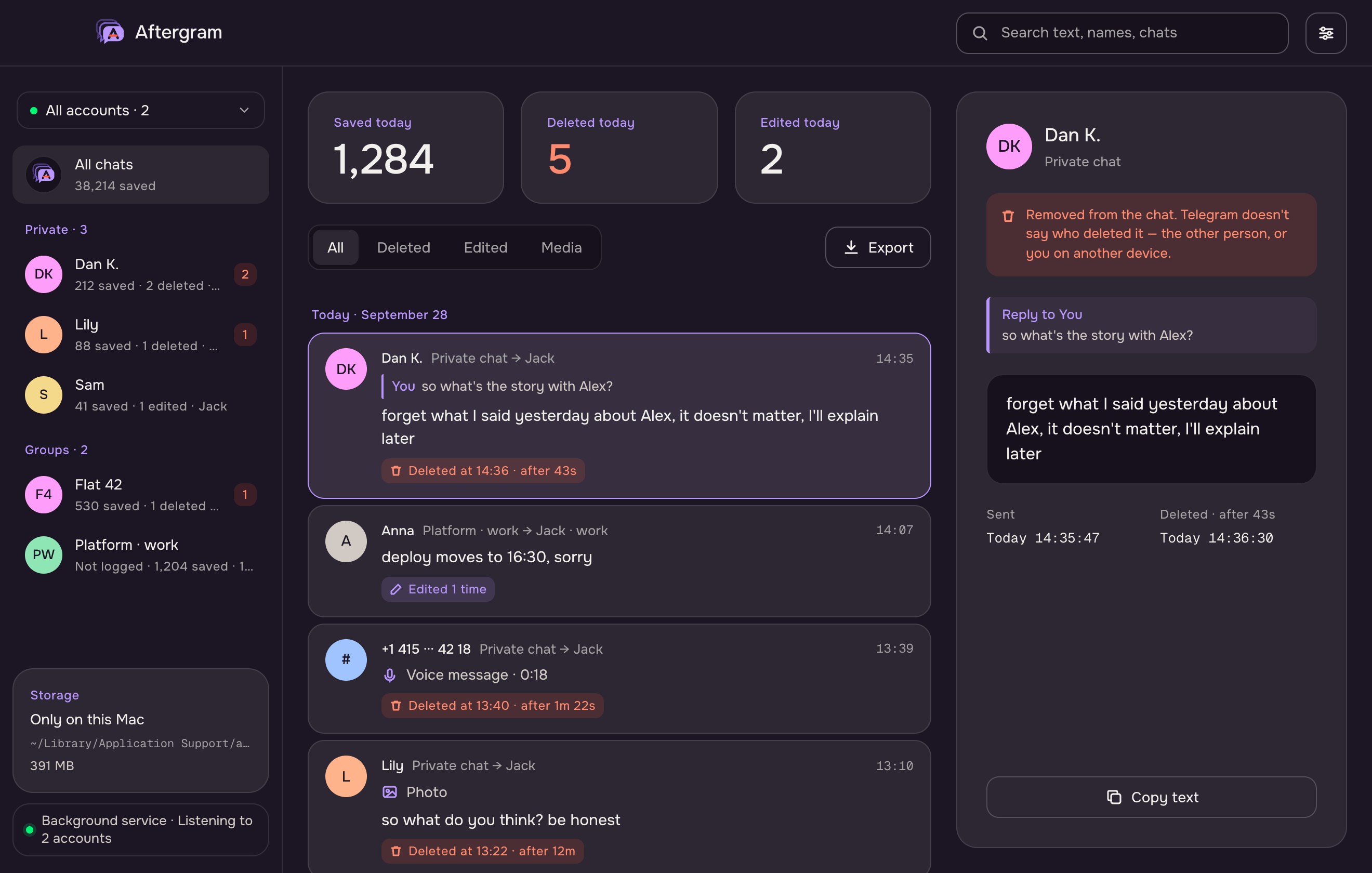
Sample data throughout this page. Aftergram shows your own chats once you sign in.
What it keeps
Everything Telegram lets people take back.
And the context around it: who said what, to what, and what it said before.
Deleted messages
Text, sender, chat and exact times — even for messages that lived a few seconds. A whole cleared chat is one calm notification, not fifty.
Every edit
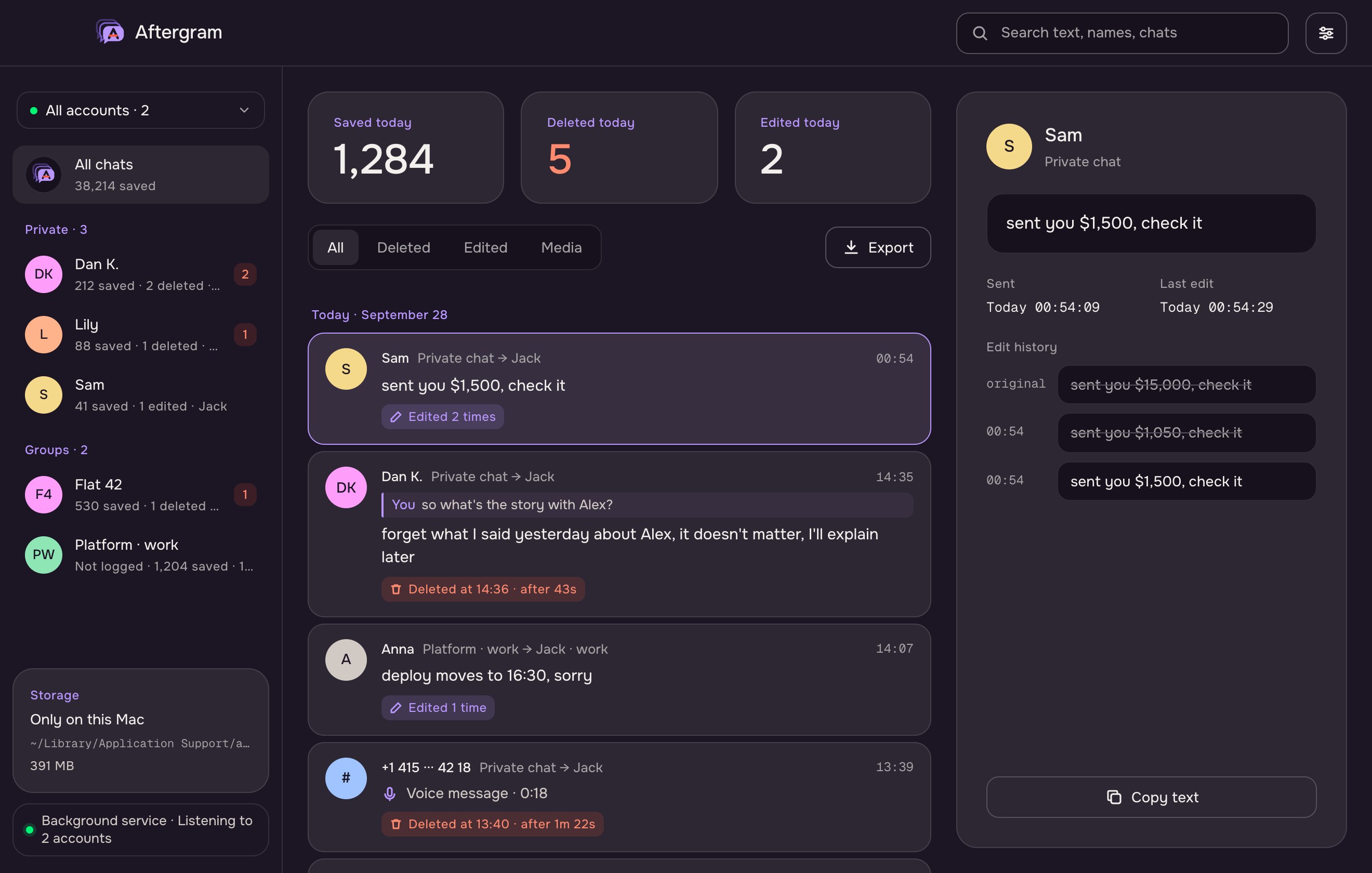
The first version and each change after it, with timestamps. “$15,000” quietly becoming “$1,500” no longer goes unnoticed.
What they replied to
Each reply keeps a quote of the message it answered — including your own — so a deleted “forget it” still makes sense a week later.
Photos, voice, video
Media up to 20 MB is saved the moment it arrives, so a deleted photo or voice note is still playable.
View-once media, if you choose
Off by default. Turn it on and view-once photos, videos and voice notes are saved on arrival — unopened in Telegram, nothing sent to the sender.
Your rules per chat
Choose what to record per chat: media, deletions, edits, notifications. Stop logging a noisy group, or clear what was saved and keep going.
Hidden chats
Keep some chats out of the list, the feed, search and notifications — still logged, behind an optional password. Closing the window locks them again.
Many accounts, one log
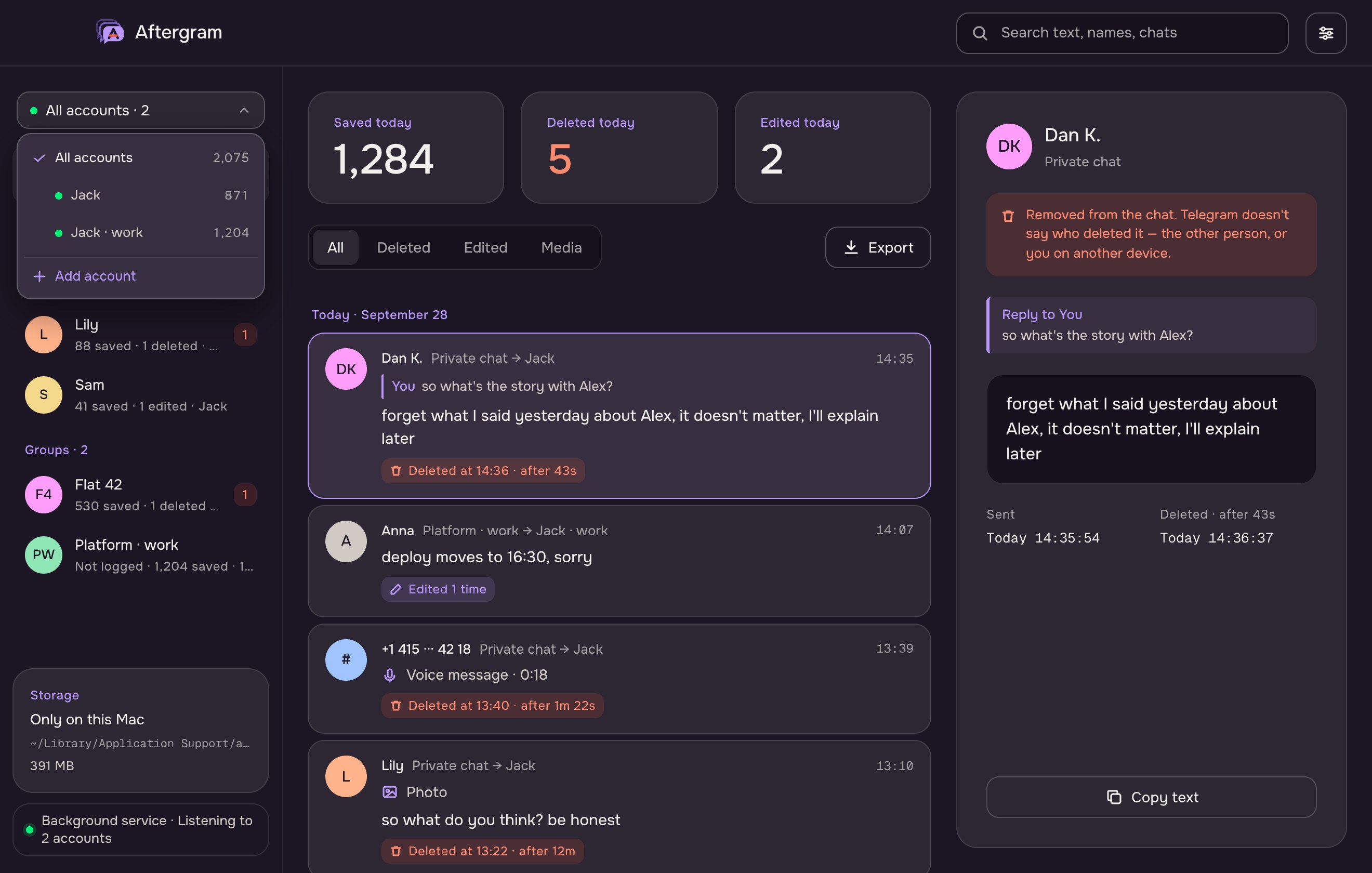
Personal and work Telegram side by side. One switcher shows every account’s connection and count, with search once the list grows.
Search and filters
Find anything across text, names and chats — in any alphabet — or narrow the feed to deleted, edited or media.
Export
Save a chat, an account or everything as readable text or JSON — deletions, replies and edit history included.
Runs in the background
An optional background service keeps listening with the window closed, starts at login and restarts itself. The window just shows what it collects.
Your own Postgres
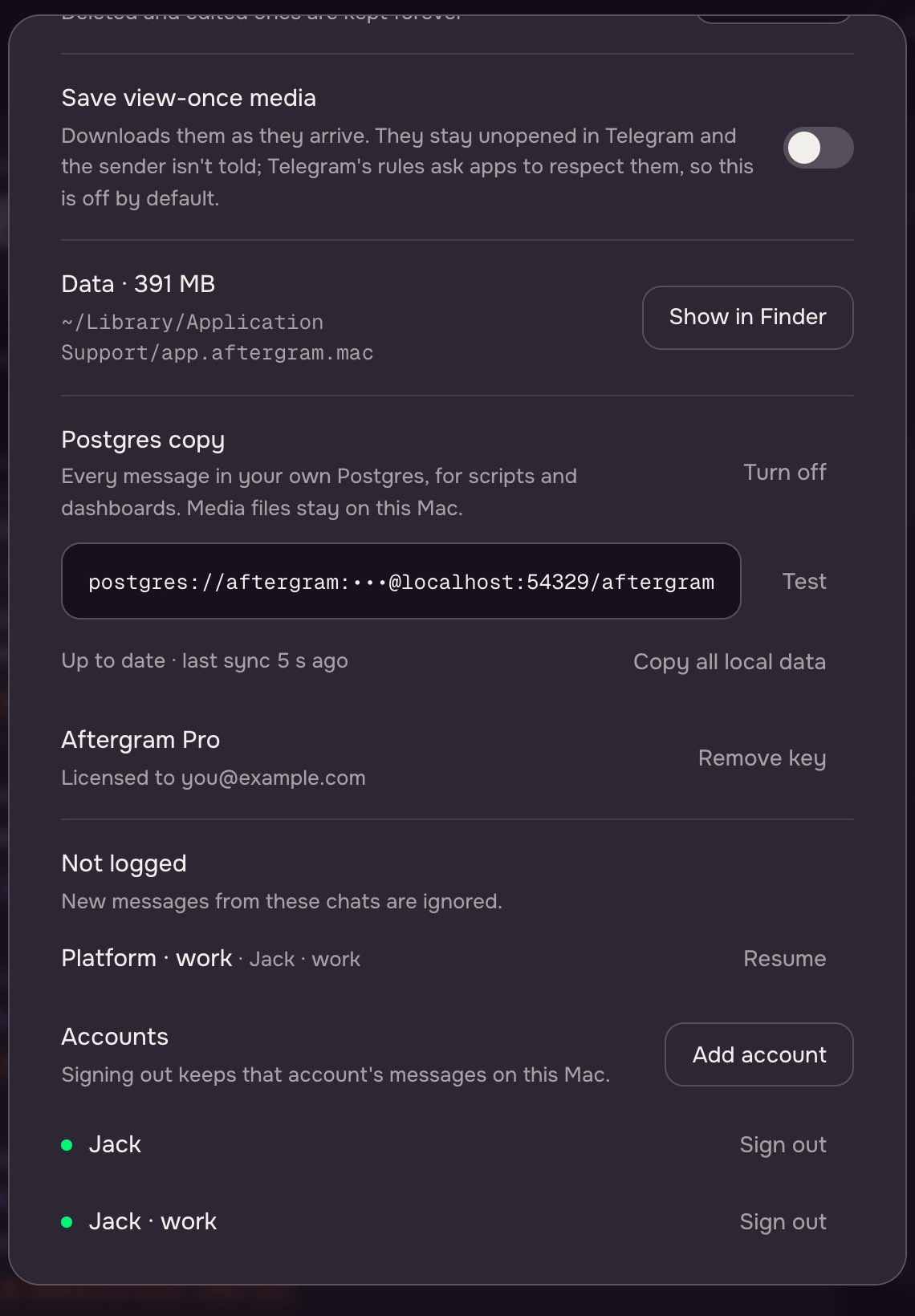
Mirror the log into a database you run, within seconds, for scripts and dashboards. The Mac stays the source; nothing goes anywhere else.
Edit history
See what it said before.
Pick any edited message and Aftergram lists the original and every later version, struck through in order. Search works across all of it — in any language.
Accounts
Two accounts or ten, one line.
Switch between accounts or read them all together. Each shows whether it’s connected and how much it has kept; add another without leaving the log.
For power users
A service, a command line, and your database.
Aftergram doesn’t need its window. Run it as a background service, drive it from Terminal, and copy everything into Postgres for your own tools.
# background: starts at login, restarts itself
aftergram service install
aftergram status
Service: running (pid 4242)
  Jack          listening since 09:12
  Jack · work   listening since 09:12
Postgres: up to date, last sync 3 s ago

# what's in the log
aftergram chats

# copy it all to your Postgres (Pro)
aftergram db set postgres://me@db:5432/aftergram
Background service
A launchd agent listens without the window, survives restarts and sleep, and reports its state to the window, the menu bar and aftergram status.
Command line
Sign in, check accounts, list chats with their deletions and edits, read the log — all from Terminal. Handy over SSH to a Mac mini.
Postgres copy
Messages, edits, deletions and replies land in plain tables within seconds. Offline? Changes queue up and catch up. Query it, graph it, back it up.
Setup
Two minutes, once.
-
Get your keys
Telegram gives every app its own api_id and api_hash at my.telegram.org. Aftergram walks you through it.
-
Sign in
Your number, the code Telegram sends you, and your cloud password if you use one. Aftergram appears in your sessions as “Aftergram · Mac”.
-
Forget about it
Aftergram sits in the menu bar, or runs as a background service with no window at all. When something disappears, you’ll know.
Privacy
Your log never leaves your Mac.
There is no Aftergram server. Nothing to breach, nothing to subpoena, nothing we could read even if we wanted to.
How Aftergram handles your data
- Messages, media and your Telegram session are stored in ~/Library/Application Support, readable only by your macOS account.
- No analytics, no tracking, no account with us.
- Your Pro key is checked on your Mac — no phoning home.
- Aftergram only reads. It never sends, marks as read or opens anything in Telegram.
- The Postgres copy goes only to a server you set up — Aftergram has none of its own.
What it can’t do — honestly
- It works while your Mac is awake. Aftergram can stop it from dozing off on the charger; a message sent and deleted while the Mac slept can’t be recovered.
- Secret chats stay out of reach, as Telegram intends. View-once media is saved only if you turn it on, and only if it arrives before anyone opens it.
- Telegram doesn’t say who deleted a message, so Aftergram doesn’t guess.
- Channels are not logged — only private chats and groups.
Pricing
Free catches the deletions. Pro keeps everything.
Every download starts with 7 days of Pro. After that, Free keeps working for as long as you like.
Coming soon The first release is almost ready. Prices are final; stay tuned for the launch news.
- Deleted and edited messages
- Replies with the message they answered
- One Telegram account
- 7 days of history
- Hidden chats, search, notifications
- Background service and command line
- Everything in Free
- Up to 10 Telegram accounts
- History up to a year — deletions kept forever
- Photos, voice, video, files — and view-once media if you want it
- Per-chat settings
- Export to text and JSON
- Copy to your own Postgres
- Free updates for Aftergram 1.x
| Compare | Free | Pro |
|---|---|---|
| Deleted and edited messages, replies | ✓ | ✓ |
| Telegram accounts | 1 | up to 10 |
| Regular messages kept | 7 days | up to a year |
| Deleted and edited messages kept | forever | forever |
| Photos, voice, video and files | — | ✓ |
| View-once media (opt-in) | — | ✓ |
| Per-chat settings | — | ✓ |
| Export to .txt and .json | — | ✓ |
| Postgres copy | — | ✓ |
| Hidden chats, search, notifications | ✓ | ✓ |
| Background service and CLI | ✓ | ✓ |
Questions
Before you download.
Will the other person know I use Aftergram?
No. Aftergram is another session of your own account, like Telegram on a second computer. Nothing is sent to anyone; only you see “Aftergram · Mac” in your list of sessions.
Is it safe for my Telegram account?
Aftergram signs in through Telegram’s official API and only reads — it sends nothing and automates nothing, which is what Telegram’s anti-spam rules watch for. It is still a third-party app, so use it at your own discretion.
Why do I need my own api_id?
Telegram asks every app to use its own keys. Yours take a minute to create at my.telegram.org, stay on your Mac, and keep Aftergram independent of anyone else’s keys.
Does it work when my Mac is asleep?
No Mac app does. On the charger Aftergram can stop the Mac from going to sleep on its own; after sleep it reconnects by itself and fetches what arrived meanwhile. A message both sent and deleted during sleep is the one thing it can’t catch.
Can it recover messages deleted before I installed it?
No — Telegram doesn’t keep them. On first sign-in Aftergram saves the recent history of your latest chats, so anything deleted from then on is kept.
Does saving view-once media tell the sender?
No. Aftergram downloads the file without opening the message, so it stays unopened in Telegram and you can still view it there once. It’s off by default: Telegram asks apps to respect view-once, so whether to keep them is your call.
What does the Postgres copy contain?
Every stored message with its chat, sender, times, deletion mark, reply quote and full edit history, in two plain tables. Media files stay on your Mac; their local path is copied. Aftergram only writes to the database you point it at. Schema and example queries.
Do I have to keep the window open?
No. Turn on the background service in Settings (or run aftergram service install) and Aftergram keeps listening with the window closed, from login onward.
Is there a Windows version?
Not yet. Aftergram is built for macOS 13 Ventura or later on Apple silicon.
Aftergram 1.1 · macOS 13+ · Apple silicon
What’s left after they delete it.
Download for Mac →Includes 7 days of Pro. No account, no email, no card. Read the docs.