Documentation · Aftergram 1.1
Aftergram docs
Everything Aftergram does, how to set it up, and how to run it without a window. Aftergram is a Mac app that signs in to your own Telegram as one more device and keeps a private log of incoming messages, so deleted and edited ones stay readable.
Install
- Download Aftergram and drag
Aftergram.appto Applications. It needs macOS 13 Ventura or later on Apple silicon. - Open it. The first launch starts a 7-day Pro trial; after that, Free keeps working.
- Follow the three sign-in steps below. Aftergram then lives in the menu bar; closing the window doesn’t stop it.
Move the app to Applications before turning on the background service: the service remembers where the app was when you installed it.
Telegram API keys
Telegram asks every app to use its own keys. You create yours once; they stay on your Mac.
- Go to
my.telegram.organd sign in with your phone number. - Open API development tools and create an application. Any name and short description will do.
- Copy
api_id(a number) andapi_hash(32 characters) into Aftergram’s first step.
Sign in
- Phone: in international format, e.g.
+44 7700 900123. - Code: Telegram sends it as a message to your other devices.
- Cloud password, if two-step verification is on. A wrong password can simply be retried; Start over goes back to the phone step.
Aftergram appears in Telegram → Settings → Devices as Aftergram · Mac. On first sign-in it saves the recent history of your 50 latest chats, so a message deleted from then on is caught even if it was sent before you installed Aftergram.
You can also sign in from Terminal with aftergram login. With the background service running, both the window and the command line hand the new session to the service.
Reading the log
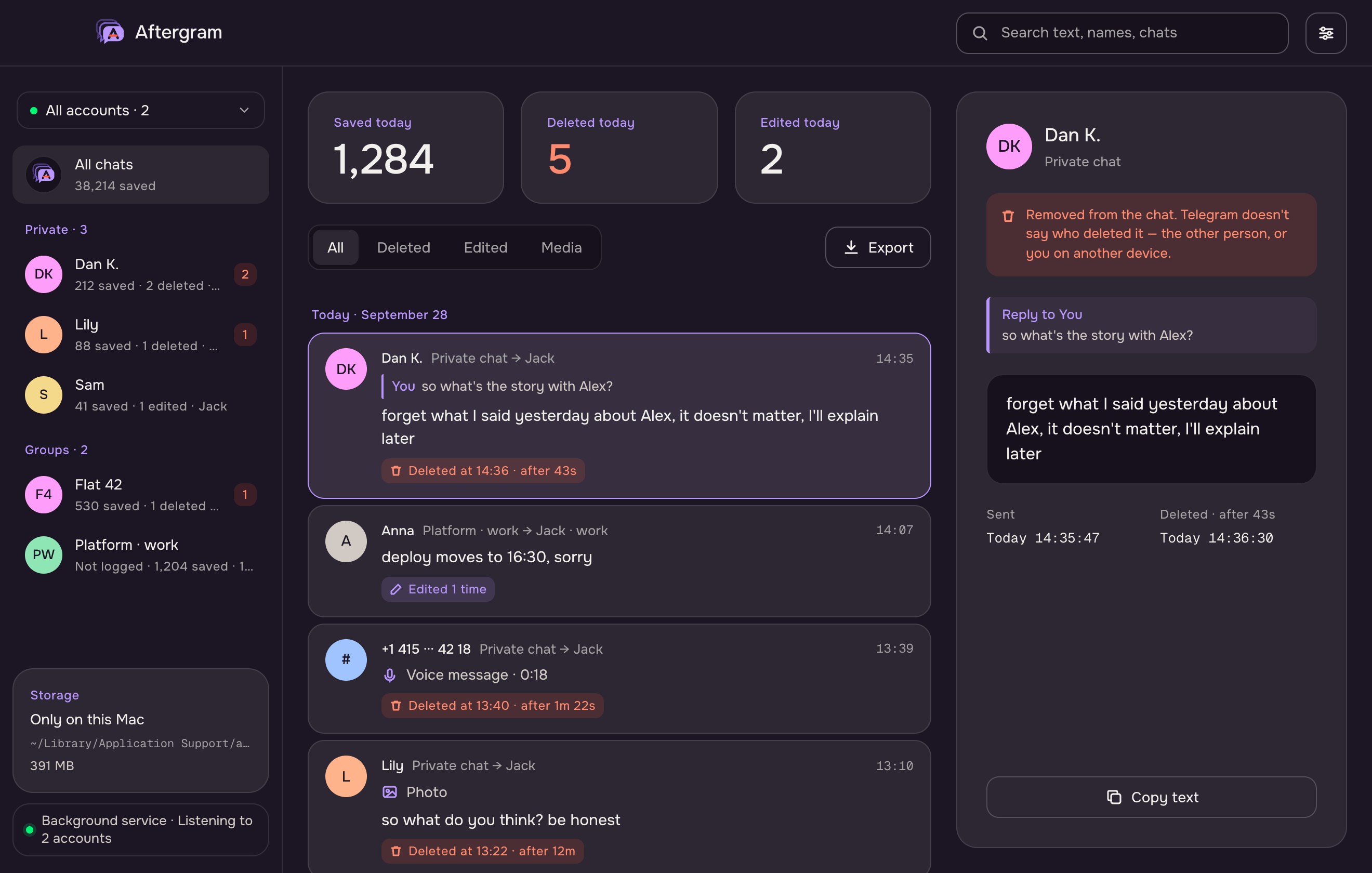
- Chats on the left, split into private chats and groups, with counts of what was saved and deleted. All chats shows everything.
- Feed in the middle, newest first, grouped by day. Filters: All, Deleted, Edited, Media. Arrow keys move through it.
- Search looks through text, sender names and chat titles, case-insensitively in any alphabet.
- Deleted messages carry an ember tag with the time and how long they lived:
Deleted at 14:27 · after 43s. Telegram doesn’t say who deleted a message, so Aftergram doesn’t guess. - Edited messages show the original and every later version, oldest first, in the panel on the right.
- Replies show a quote of the message they answered, as it was when the reply arrived — also when the original was your own message, or has since been deleted.
- Copy text copies the selected message.
Chat settings
Pick a chat, then Chat settings:
- What to record in this chat: media, deletions, edits, notifications. Chats without their own choice follow the defaults for private chats or groups (Settings). Pro
- Stop logging: new messages from this chat are ignored. Optionally delete what was saved. Resume it any time from Settings → Not logged.
- Delete saved messages: removes this chat’s messages, history and media from Aftergram and keeps logging. Nothing changes in Telegram.
- Hide: see below.
Hidden chats
A hidden chat is still logged but kept out of the chat list, the feed, stats, search, export, the command line and notifications. Open them from Settings → Hidden chats, optionally behind a password (at least 4 characters, stored as a PBKDF2 hash). Closing the window locks them again.
Accounts
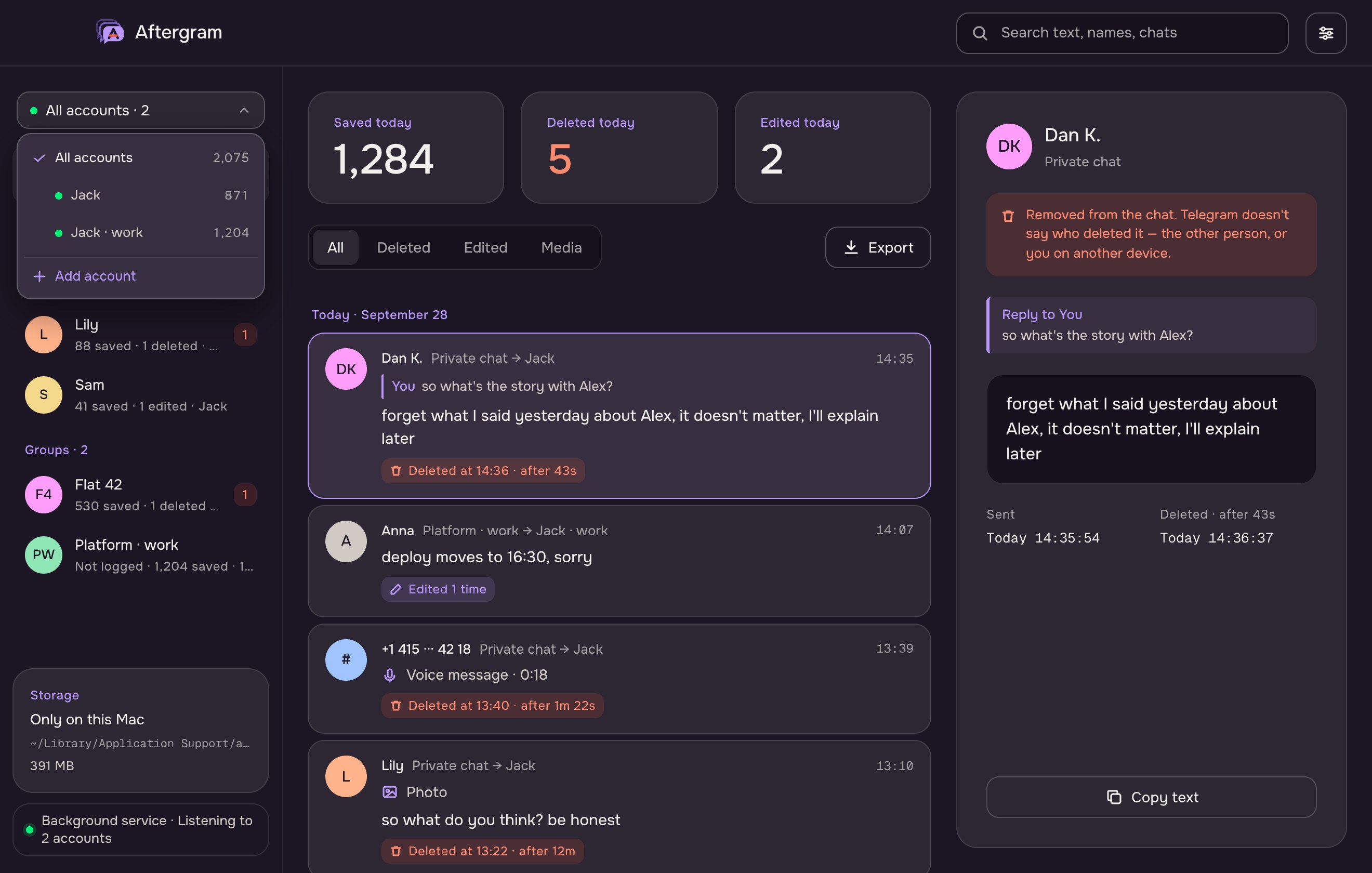
The switcher at the top of the sidebar shows the account on view or All accounts. Its list shows each account’s connection (green: listening) and how many messages it has kept, with a search field from six accounts on, and Add account. Free listens to one account, Pro to up to ten.
Sign out (Settings → Accounts) ends the session in Telegram and removes the account; its messages stay in the log.
Media and view-once
With Pro, photos, voice and video messages, videos, audio and files up to 20 MB are downloaded as they arrive, so they stay playable after a deletion. Stickers, contacts, locations and polls are described, not downloaded. Pro
View-once media
View-once photos, videos, voice and video messages are labelled as such (View-once voice message · 0:05). Settings → Save view-once media (off by default) downloads them on arrival:
- Aftergram downloads the file without opening the message: it stays unopened in Telegram, you can still view it there once, and the sender is not told.
- Only media that arrives while Aftergram listens, before anyone opens it, can be saved; once opened, Telegram deletes it.
Telegram’s API terms ask apps to respect self-destructing media. Whether to keep it is your decision; that’s why the switch is off by default.
Export
Export saves what the feed shows — one chat, one account or everything, with the current filter — as .txt or .json. Pro
=== Dan K. · private chat ===
[2026-09-27 14:26:30] Dan K.: forget what I said yesterday about Alex
    ↩ reply to You: so what's the story with Alex?
    ✕ deleted 2026-09-27 14:27:13
JSON has one object per chat with its messages: id, date, sender, text, media, mediaFile, deletedAt, replyTo and versions (every version, when edited).
Settings
| Private chats / Groups | Default recording for each kind: media, deletions, edits, notifications. |
| Open at login | Starts in the menu bar without a window. |
| Background service | Run in background, Start, Stop, Remove. See below. |
| Keep the Mac awake | Off, While charging, Always. A sleeping Mac can’t receive messages. |
| Keep regular messages for | 7 days (Free) up to a year (Pro). Deleted and edited messages are kept forever. |
| Save view-once media | Off by default. Pro. |
| Data | Size on disk; Show in Finder. |
| Postgres copy | URL, Test, Turn on/off, status, Copy all local data. Pro. |
| Hidden chats | Open, lock, set or remove the password. |
| Accounts | Add account, Sign out. |
Background service
The service listens to Telegram without the window: it starts at login, restarts itself if it stops, and keeps going when you close Aftergram. Turn it on in Settings → Background service → Run in background, or:
aftergram service install   # launchd agent app.aftergram.service
aftergram status            # running? each account listening?
While it runs, the window is a viewer: it shows what the service collects and changes to settings reach the service within seconds. Signing in, adding and signing out accounts work from the window too — the window does the sign-in and restarts the service with the new session. Only one process listens at a time; the other waits.
The aftergram command is linked to ~/.local/bin/aftergram when the service is installed. If your shell doesn’t find it:
echo 'export PATH="$HOME/.local/bin:$PATH"' >> ~/.zshrc && source ~/.zshrc
Command line
The app binary is also the command line: Aftergram.app/Contents/MacOS/aftergram <command>. Without a command it opens the window.
| Command | What it does |
|---|---|
service install | Run Aftergram in the background (starts at login, restarts itself). |
service start · stop | Start the installed service now; stop it until the next login. |
service uninstall | Remove the background service. Data stays. |
status | Service, plan, each account’s state, the Postgres copy. |
login | Add an account, or sign back in to one whose session ended (API keys, phone, code, cloud password). |
accounts | List accounts. |
chats | Table of logged chats: messages, deleted, edited, last message. Hidden chats are left out. |
logs | The last 40 lines of the service log. |
db set <url> | Test and turn on the Postgres copy. |
db status | Is the copy up to date; queue; last sync; URL without password. |
db migrate | Copy every local message to Postgres again (safe to repeat). |
db off | Stop copying. What is in Postgres stays. |
run | Listen in the foreground (what the service runs). |
Postgres copy
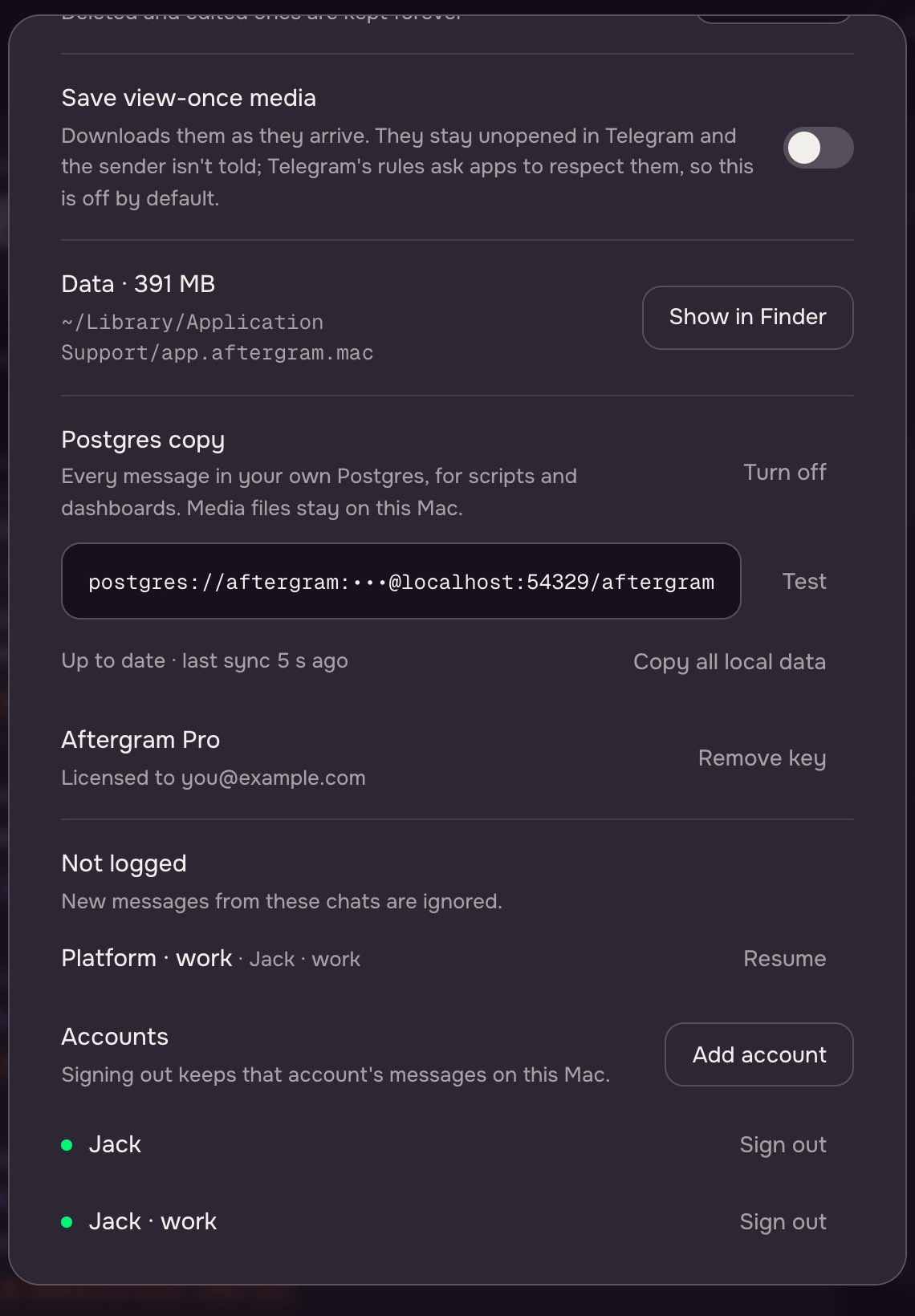
Aftergram can mirror its log into a Postgres database you run — for SQL, scripts, Grafana or Metabase. The Mac stays the source of truth. Pro
Turn it on
Settings → Postgres copy: paste a URL, Test, Turn on. Or aftergram db set <url>. Aftergram creates its tables itself. A local database in Docker:
docker run -d --name aftergram-pg --restart unless-stopped \
  -e POSTGRES_USER=aftergram -e POSTGRES_PASSWORD=aftergram -e POSTGRES_DB=aftergram \
  -p 5432:5432 -v aftergram-pg:/var/lib/postgresql/data postgres:17

aftergram db set postgres://aftergram:aftergram@localhost:5432/aftergram
Hosted Postgres works too; TLS is used when the server offers it, and ?sslmode=require insists on it.
How it syncs
- Every stored or changed message is queued on the Mac; the queue goes to Postgres every few seconds, 500 messages per transaction.
- Postgres unreachable: the queue waits on disk and catches up, retrying from 3 seconds to 5 minutes apart. Wrong password or missing permission: copying pauses until you change the URL.
- Turning the copy on sends everything already stored first. Copy all local data /
db migratedoes it again; nothing is duplicated. - Removing old regular messages on the Mac (retention) never touches Postgres: the copy is your archive. Deleting a chat’s saved messages by hand deletes them there too.
- Media files stay on the Mac; their local path is copied.
Tables
| messages | |
|---|---|
account, scope, msg_id | Primary key. account is your Telegram user id; scope is 0 for private chats and basic groups, the channel id for supergroups. |
chat_id, chat_title, chat_kind | Chat (user or group). |
sender_id, sender_name | Who sent it. |
date, text | Unix seconds; current text. |
media_kind, media_label, media_path | Media type, label, file on the Mac. |
deleted_at | When it disappeared from the chat, or null. |
edit_count, last_edit_at | Edits. |
reply_to, reply_sender, reply_text | The message it answered, as it was then. |
synced_at | When Postgres last got this row. |
edits(account, scope, msg_id, at, text) holds every version of edited messages, the original first. aftergram_meta holds the schema version.
Example queries
-- what was deleted this week
SELECT chat_title, sender_name, text, to_timestamp(deleted_at) AS deleted
FROM messages WHERE deleted_at > extract(epoch FROM now() - interval '7 days')
ORDER BY deleted_at DESC;

-- every version of edited messages
SELECT m.chat_title, e.text, to_timestamp(e.at) AS at
FROM edits e JOIN messages m USING (account, scope, msg_id)
ORDER BY m.date, e.at;

-- who deletes the most
SELECT sender_name, count(*) FROM messages
WHERE deleted_at IS NOT NULL GROUP BY 1 ORDER BY 2 DESC LIMIT 10;
Where data lives
Everything is in ~/Library/Application Support/app.aftergram.mac/, readable only by your macOS account:
aftergram.db | The log (SQLite). |
media/ | Downloaded media. |
accounts/<slot>/session.db | Each account’s Telegram session. |
config.json | API keys, settings, per-chat rules, Pro key, Postgres URL. |
service/ | Service status, service.log, Postgres copy status. |
There is no Aftergram server. Nothing is sent anywhere except Telegram itself and, if you set one up, your own Postgres.
Plans and licence
Every install starts with 7 days of Pro. Free then keeps catching deletions and edits for one account with 7 days of history. Pro is a one-time $19 key for all your Macs: up to 10 accounts, up to a year of history, media and view-once media, per-chat settings, export and the Postgres copy. Enter the key in Settings → Upgrade; it is checked on your Mac, offline.
Troubleshooting
“needs sign-in” in aftergram status
Telegram ended the session (for example, it was terminated in Devices). Sign in again from the window or with aftergram login; the log is kept.
Nothing arrives after the Mac slept
Aftergram reconnects by itself after sleep and fetches what arrived meanwhile. A message sent and deleted during sleep can’t be caught; set Keep the Mac awake → While charging.
aftergram: command not found
Add ~/.local/bin to your PATH (see Background service), or use the full path to the app binary.
Postgres says “stopped”
The URL, password or permissions are wrong. aftergram db status shows the server’s message; fix it with aftergram db set <url>.
More detail
aftergram logs shows the service log; aftergram status shows each account and the Postgres copy.
Uninstall
aftergram service uninstall                       # if you used the service
rm -rf ~/Library/Application\ Support/app.aftergram.mac   # deletes the whole log
Then move Aftergram.app to the Bin and remove Aftergram · Mac from Telegram → Settings → Devices.